Free Cleaning Instruction Card software for food factories
CIC Maker builds, authorises and prints Cleaning Instruction Cards — the controlled document that hangs at a machine and tells the hygiene team exactly how to clean it. It runs in your browser, saves into a folder you choose on your own computer, and sends nothing anywhere.
Built inside a working food factory, where hygiene management documentation faces BRCGS and retailer audits — which is why every card carries its chemicals, contact times, PPE, photographs and a signed authorisation rather than leaving them optional.
Free, no sign-up. Authoring needs desktop Chrome or Edge — phones can read and print finished cards.
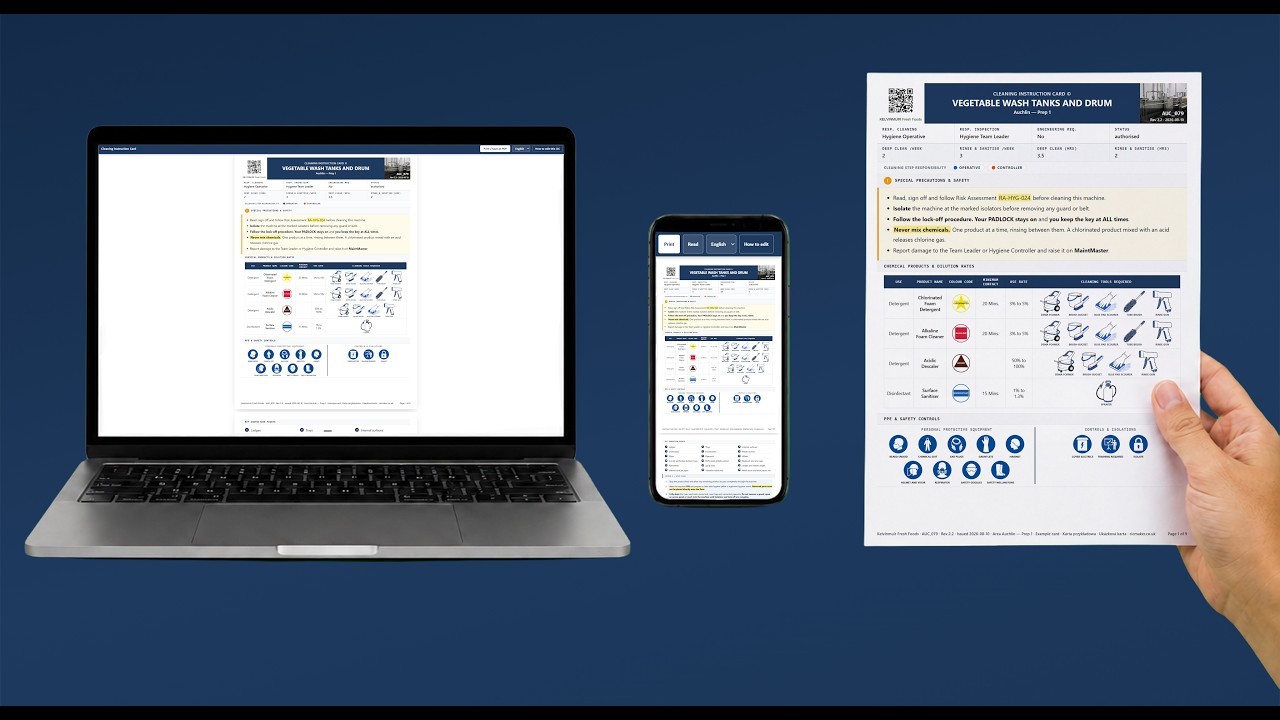
Watch a card built end to end — the printed card updates live as you type, so you never need a preview button or an export to check what it looks like. Opens YouTube in a new tab.
Nothing is uploaded. Your cards are saved to a folder you pick, or kept in your browser. There is no server, no account, no analytics and no AI calls — the tool has nothing to upload to, so no card ever leaves your network. The privacy policy is one page because there is nothing to disclose.
What free software can I use to make cleaning instruction cards?
CIC Maker is free software for making Cleaning Instruction Cards. It costs nothing, needs no account and runs in your browser. It builds each card as a controlled document — chemicals with dilution and contact time, numbered method steps with photographs, PPE and safety-control pictograms, and a signed authorisation — and prints it on A4. Files are saved to a folder on your own computer, so nothing you write leaves your network. Authoring needs desktop Chrome or Edge.
What should a cleaning instruction card show?
A usable card answers, on one document, everything a cleaner needs at the machine: which chemicals at which dilution and contact time, what PPE to wear, how the machine is isolated before cleaning, the method as numbered steps, where the dirt hides, and who prepared and authorised the card. It is a working document inside a site's hygiene management system, and it is the food safety evidence an auditor asks for when they ask how a piece of equipment is cleaned. CIC Maker builds all of that into every card.
There is a field-by-field walkthrough, with a template, in what a Cleaning Instruction Card is.
Print that behaves
A4 pages with the document-control header, repeating table headers and no step split across a page break. What you see in the preview is the page that prints.
Icons drawn for food factories
149 hygiene pictograms — PPE, cleaning tools, isolations and chemical colour codes, including the ones only food sites use.
Photographs with pins
Steps carry their own photographs, and key inspection points take numbered pins — mark where the dirt hides and name it.
Five languages on one card
English, Polish, Romanian, Russian and Czech, with translation freshness tracked per step — edited English marks its translations as needing review.
What is the difference between a cleaning instruction card and a hygiene SOP?
A hygiene SOP describes a procedure; a Cleaning Instruction Card belongs to one machine. The card is the laminated document that hangs at the equipment with that machine's chemicals, photographs and inspection points on it. Many sites keep both: the SOP for the system, the card for the machine. If you need SOPs, the same author builds a free SOP tool at sopmaker.uk.
Which browsers does CIC Maker work in?
Authoring needs desktop Google Chrome or Microsoft Edge, because CIC Maker uses the File System Access API to save into a folder you choose. On a phone or tablet you can watch the film, read the manual and open, read and print finished cards — you just cannot author new ones there.
Where is my data stored?
In a folder you pick on your own computer or shared drive, or in your browser if you use it without a folder. There is no server, no account, no analytics and no AI calls. Nothing you type is transmitted anywhere — the browser's own security policy on this site blocks outbound calls even if one were added by accident.
Is CIC Maker really free?
Yes. Free to use for anything, including commercial work, with no paid tier, no sign-up and no usage limit. It is not open source: the licence keeps the software and the icon set the author's, and every card you make with it stays yours.
Can I print cards in Polish or Czech?
Yes. A card can carry its text in English, Polish, Romanian, Russian and Czech, and prints a separate page run for each language you fill in. The card tracks which translations are current, so a step edited in English shows its other languages as needing review rather than silently printing stale text.
Who made CIC Maker?
Jakub Rimek, a web developer in Fife, Scotland, who builds hygiene and compliance tools for food manufacturing. CIC Maker comes from years of writing real cleaning documentation inside a working factory — the cards it prints are the kind that hang on machines and get shown to auditors, not a template invented for a website.
More of his work is at rimek.uk. Got an idea, or want the tool adapted to how your site works? Email jakub@rimek.uk.
Read more
- What a Cleaning Instruction Card is — the document, field by field, and who signs it.
- The user manual — the whole tool explained, with screenshots.
- An example card — a real exported card you can read and print (about 15 MB, heavy on a phone).